
Welcome to Game Assets Blog.
If you are reading this, chances are you share the same itch that I have. You’ve spent hours lost in digital worlds, slaying dragons, building empires, or navigating intense storylines. But at some point, the controller wasn’t enough. You stopped just playing the game and started wondering, “How did they actually make this?”
Welcome to the other side of the screen.
This blog is dedicated to the art, science, and sometimes frustrating chaos of game development. And for my very first post, we need to start with the absolute foundation. Before we talk about complex code or level design, we need to talk about the ingredients.
We need to talk about Game Assets.
What Exactly Is a Game Asset?
When you play a game, the experience feels seamless. It feels like one cohesive world. But to a developer, that world is a massive jigsaw puzzle made of thousands of tiny, individual pieces.
Simply put, a Game Asset is any piece of digital content that goes into building your game.
If game development is like cooking an elaborate meal, the code is the recipe, the game engine is the kitchen, and the assets are the ingredients—the vegetables, the spices, and the proteins. Without assets, you don’t have a meal; you just have an empty kitchen and a piece of paper.
Everything you see, hear, and interact with in a game started its life as an asset sitting in a folder on someone’s computer.
The Core Categories: Breaking Down the Puzzle
Assets generally fall into a few major buckets. Depending on the type of game you are making (2D platformer vs. hyper-realistic 3D RPG), the balance of these ingredients will shift.
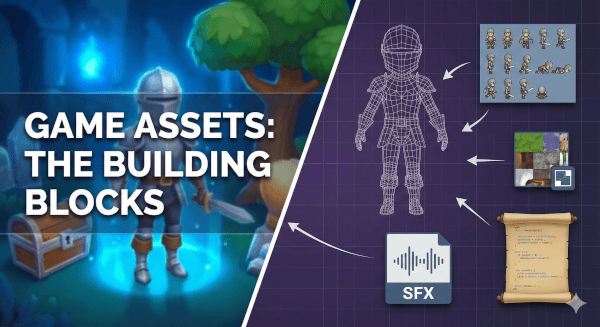
1. Visual Assets ( The “Look”)
These are usually what people think of first. They are the things the player actually sees on screen.
- 3D Models: The characters, the cars, the environmental rocks, and buildings.
- 2D Sprites: The characters in a pixel-art game, the background images, or the buttons on your UI (User Interface).
- Textures & Materials: The “paint” that goes on 3D models to make them look like wood, metal, or skin.
- Animations: The data that tells a 3D model how to walk, jump, or swing a sword.
2. Audio Assets (The “Vibe”)
Audio is often undervalued by beginners, but it’s crucial for immersion. A horror game isn’t scary without sound.
- Sound Effects (SFX): The footsteps, gunshots, UI clicks, and monster growls.
- Music: The background soundtrack that sets the emotional tone.
- Voice Over (VO): The spoken dialogue of your characters.
3. Scripting Assets (The “Brains”)
While some argue code isn’t a traditional “asset” in the way a 3D model is, in modern development engines like Unity or Unreal, scripts are absolutely files you manage and utilize.
- Scripts: The files of code (C#, C++, Python, Blueprints) that tell the visual assets what to do when the player presses a button.
Related Topic
I Tested 20 “Free” AI Tools. Here Is The Only Zero-Budget Pipeline That Actually Works.
Why Does This Distinction Matter?
Why bother defining them? Why not just call it all “game stuff”?
Understanding game assets is the first step toward actually finishing a project.
When you realize that a game isn’t one giant, insurmountable object, but rather a checklist of 500 smaller, manageable objects, the task becomes less scary. You stop trying to “make a game” today, and start trying to “make a 3D barrel model” or “record a jumping sound effect.”
Furthermore, knowing what assets are allows you to decide how you want to work. Are you an artist? Great, focus on visual assets. Are you a coder? Focus on the scripts.
In the indie dev world, you rarely make every single asset yourself. Recognizing these categories helps you know what you need to learn, and what you might need to buy from an asset store or hire a freelancer to create.
What’s Next?
On this blog, we are going to dive deep into these categories. We’ll explore how to create them, where to find free ones, how to organize them so your project doesn’t explode, and how to optimize them so your game actually runs smoothly.
Whether you are here to learn how to model your first sword in Blender, or how to manage an inventory system in Unity, stick around. We’re just getting started.
Leave a Reply