
I have a hard drive sitting in the bottom drawer of my desk that I call “The Cemetery.”
It’s a dusty, 4TB external brick that contains the digital corpses of my last decade as an indie developer. If you were to plug it in, you’d find folders with optimistic names like Project_Vanguard_Final, Nebula_RPG_Concept, and Cyber_Noir_Build_0.9. To the outside world, these look like failed ideas. But you and I know the truth. These ideas weren’t bad. In fact, some of them were brilliant.
They didn’t die because I lacked vision. They didn’t die because I couldn’t write code or model a mesh. They died in the “Miserable Middle”—that soul-crushing, endless stretch of development that sits between the excitement of a prototype and the polish of a shipped product.
For years, I believed the Miserable Middle was just the price of admission. It was the grind you had to survive to earn the title of “Game Developer.” I spent thousands of hours manually UV unwrapping rocks, debugging race conditions in save systems, and writing boilerplate dialogue trees that I hated. I burned out, shelved the projects, and moved on to the next shiny idea, only to repeat the cycle.
Then came the first wave of AI—ChatGPT and the early Copilots. They were helpful, sure. They were like having a very smart junior developer sitting next to me who could answer questions. But they didn’t solve the Middle. They just helped me write the code that I still had to manage, debug, and integrate. I was still the bottleneck.
But recently, the landscape shifted. We moved from Passive AI (Chatbots) to Agentic AI (Systems that act).
For the first time in my career, I am not just a solo developer spinning plates. I am the Director of a digital department. I have agents that fix bugs while I sleep. I have agents that texture models while I design levels. And that Cemetery in my desk drawer? I’ve started dragging folders out of it.
This is the story of how I stopped coding every line and started managing an army of ghosts—and how specific tools like Aider, Cursor, and Inworld finally built the bridge over the Miserable Middle.
The Architecture of Burnout (And Why Chatbots Failed Me)
To understand why Agentic AI is different, we have to look at why the “Chatbot Era” (2023-2024) ultimately failed the solo dev.
I remember the first time I used GPT-4 to write a script for a Unity project. I asked it for a “Third Person Controller.” It spat out a decent script. I copy-pasted it into Visual Studio. It worked… mostly. But then I needed to integrate it with my specific animation system. Then I needed to make it work with the new Input System. Then I found a bug where the player would slide down slopes indefinitely.
Every time I hit a snag, I had to copy the code, paste it back into the chatbot, explain the error, wait for a response, copy it back, and test. The Context Switching was killing me. The AI was generating code, but I was still doing the integration labor.
This is where the “Miserable Middle” thrives. It lives in the friction between tools. It lives in the “glue code.”
Agentic AI removes the friction.
An “Agent” isn’t just a text generator. It has access to tools. It can read your file system. It can run terminal commands. It can see the linter errors in your IDE. It doesn’t ask you to copy-paste; it asks for permission to apply the fix.
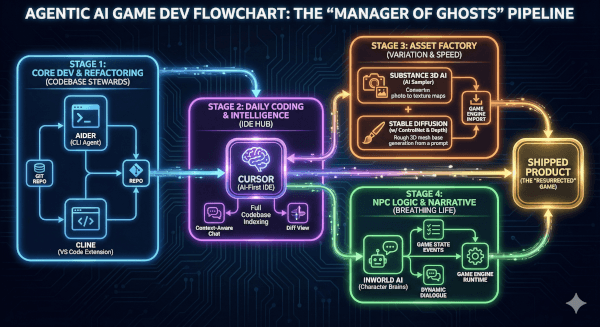
The Codebase Steward (Enter Aider & Cline)
The biggest killer of my projects was always “Technical Debt.” I would prototype a system quickly, promising myself I’d clean it up later. “Later” never came. Six months in, my codebase would be a spaghetti monster of dependencies that I was too afraid to touch.
In my most recent revival project—a tactical stealth game I abandoned in 2022—I faced this exact wall. The entire inventory system was hard-coded and brittle. In the old days, refactoring this would have taken me a week of agonizing, error-prone work.
This time, I opened my terminal and typed aider.
Aider is a command-line tool that pairs with LLMs (I use Claude 3.5 Sonnet via API) to edit code in your local git repository. It’s not a chat window; it’s a collaborator that lives inside your repo.
Here is the actual workflow I used to refactor a legacy disaster:
- The Context Load: I didn’t paste code. I simply typed:
/add Assets/Scripts/Inventory/*.cs Assets/Scripts/UI/InventoryUI.csAider read the files and built a mental map of how the data flowed between the backend data and the frontend UI. - The Refactor Command: I gave it a high-level objective, not a line-by-line instruction: “Create an interface
IInventoryItemand refactor theInventoryManagerto use a dictionary lookup instead of a list. Update the UI to reflect these changes. Ensure serialization is preserved.” - The Execution: I watched the terminal. Aider didn’t ask me to do anything. It proposed a plan.Plan: Define interface in new file. Modify Manager. Update UI references.I typed “Go.”Aider created the file. It opened the existing scripts, deleted the old list logic, injected the dictionary logic, and updated the UI calls. It then—and this is the magic part—ran the project’s unit tests (which I had hooked up). It saw a compilation error in a script I hadn’t even mentioned, realized the dependency, added that file to the chat, fixed the error, and re-ran the test.
- Result: Green checkmarks.
It took 12 minutes.
I sat there, coffee in hand, feeling a strange mix of guilt and elation. I hadn’t written a line of code, but the code was better than I would have written. I wasn’t the bricklayer anymore; I was the architect. Aider had acted as my “Senior Engineer,” handling the grunt work of the refactor while I focused on the design implications of the new inventory system.
Key Takeaway for Devs: If you are still copy-pasting code into a browser window, you are working too hard. Tools like Aider or Cline (an extension for VS Code) allow the AI to touch the files. That is the difference between a toy and a tool.
The “IDE of the Future” (Living in Cursor)
While Aider is my heavy lifter for big refactors, my daily driver has shifted to Cursor.
For those unaware, Cursor is a fork of VS Code with AI baked into the silicon of the editor. But calling it “VS Code with AI” is like calling a smartphone a “phone with a calculator.” It misses the point.
The feature that changed my life is “Composer” (or Ctrl+K codebase indexing).
In a standard Copilot setup, the AI only really knows about the file you have open. It guesses based on recent tabs. Cursor, however, indexes your entire folder structure. It creates embeddings of your documentation, your assets, and your obscure utility scripts.
The “Real-World” Problem: I was working on a shader graph for a holographic shield. I needed a C# script to drive the shader parameters based on player health. I also needed it to interact with a specific audio manager I had written three years ago and completely forgotten the API for.
The Cursor Workflow: I highlighted the Update() loop and hit Cmd+K. I typed: “Modulate the ‘_HexAlpha’ and ‘_GlitchIntensity’ properties on the material based on PlayerStats.CurrentHealth. Also trigger the AudioManager.PlayGlitchSFX when health drops below 20%, but use the cooldown system from Utility.Timer so it doesn’t spam.”
Note what happened there. I referenced three different systems:
- The Shader properties (
_HexAlpha). - The Player Stats script.
- The Audio Manager.
- The Utility Timer class.
A standard LLM would have hallucinated the AudioManager methods. Cursor looked them up. It saw that my AudioManager uses a singleton pattern. It saw that Utility.Timer requires a float argument for duration.
It wrote the code perfectly on the first try, respecting the specific architecture of my messy, three-year-old project.
This eliminates the “Cognitive Load of Retrieval.” I don’t have to remember how I wrote the Timer class. I don’t have to open the Audio Manager script to check if the method is PlaySound or PlaySFX. The Agent knows. It manages the ghosts of my past code so I don’t have to haunt them myself.
The Asset Factory (Automating the Boring Art)
Code is only half the battle. The other half—the half that usually kills my motivation—is Assets.
I am a programmer first. I can model a box. I can maybe model a barrel if you give me a day. But filling a world with high-fidelity, unique props? That’s usually where I quit and go play Elden Ring.
The “Miserable Middle” of art is Variation. Making one crate is fine. Making 50 slightly different crates with different wear patterns so the world doesn’t look fake? That’s torture.
Enter Adobe Substance 3D (with AI Sampler) and ComfyUI.
For my revived project, I needed a dilapidated sci-fi corridor. I had a single, clean metal floor texture. In the past, I would have spent hours in Photoshop trying to paint rust layers.
The Workflow:
- I took a photo of a rusted dumpster behind my apartment building with my phone.
- I threw it into Substance 3D Sampler. The AI “Image to Material” feature analyzed the lighting, removed the shadows, and generated the Albedo, Normal, Roughness, and Metallic maps instantly.
- It even made the texture tileable automatically, using AI to halluncinate the edges so they blended seamlessly.
But I needed 3D props, not just textures.
I spun up a local instance of Stable Diffusion with a Depth ControlNet. I generated a grayscale depth map of a “futuristic computer terminal.” I fed this into a tool like Rodin (or increasingly, local meshing models). It gave me a rough, lumpy mesh.
It wasn’t production-ready. But it was a base. I threw it into Blender, retopologized it (using a plugin like QuadRemesher), and applied my AI-generated rust material.
The Result: I populated an entire hallway with unique debris, terminals, and panels in one evening. I didn’t sculpt a single high-poly mesh. I didn’t hand-paint a single pixel of rust. I acted as the Art Director, curating the AI’s output, combining it, and placing it.
The “Asset Tax” that usually bankrupts solo devs was gone.
Breathing Life into NPCs (Inworld AI)
The final nail in the coffin of my old projects was always the “Life” problem. You can build a beautiful world and solid mechanics, but if your NPCs just stand there repeating “Hello traveler,” the illusion breaks.
Writing dynamic dialogue systems is a nightmare. Managing state machines for NPC behavior is worse.
For the revival, I scrapped my old dialogue system entirely and integrated Inworld AI.
Inworld is a platform that lets you define “Character Brains” rather than dialogue trees. You don’t write scripts; you write backstories.
The Setup: I created a character named “Junker Silas.”
- Motivation: Wants to collect rare tech to pay off a debt.
- Personality: Paranoid, talks fast, hates the government.
- Knowledge: Knows the layout of the sewers, knows where the player can find a keycard.
I integrated the Inworld SDK into Unity. Now, when the player approaches Silas, I don’t trigger DialogueNode_01. I open a communication channel.
I (as the player) can type (or speak): “Hey Silas, I need to get into the lower levels.”
Silas (generated in real-time): “Lower levels? You got a death wish? Or maybe you’re just stupid. Look, I ain’t telling you nothing unless you got credits. Or maybe… maybe you got that fusion coil I asked for?”
The AI isn’t just chatting; it’s accessing the Game State. I configured the agent to have “Goals” and “Triggers.” If the player drops a Fusion Coil item on the ground, the Inworld agent perceives it (via a hooked event) and changes its demeanor.
The Narrative Breakthrough: Suddenly, I wasn’t writing 5,000 lines of branching dialogue that 90% of players would never see. I was defining the soul of the character and letting the Agent handle the improvisation. This turned the “content mill” of writing into a creative exercise of character design.
The Psychology of the “Director”
Transitioning to this workflow wasn’t seamless. I had to fight my own ego.
There is a part of every indie dev that takes pride in the suffering. We wear our burnout like a badge of honor. “I wrote this engine from scratch in C++,” we say, eyes bloodshot.
When I started using Aider and Cursor, I felt like I was cheating. Was I still a developer if I didn’t type the for loop myself?
But then I looked at the folder. Project_Vanguard_Final. It was actually running. The frame rate was smooth. The inventory worked. The NPCs felt alive. The vision I had in my head three years ago was finally on the screen.
I realized that Code is not the Art. The Game is the Art.
The code is just the paint. The assets are just the canvas. If Agentic AI allows me to paint faster, to use broader strokes, to finish the painting before the paint dries and cracks—then it is the greatest tool ever given to artists.
The Resurrection
I went back to “The Cemetery” drive last week. I copied over a folder from 2019—a cyberpunk detective game that I abandoned because the evidence-linking system was too complex to code alone.
I opened it in Cursor. I spun up Aider. “Analyze the EvidenceManager.cs. It’s broken. Propose a fix using a graph-based data structure.”
The ghosts are waking up.
If you are a solo dev sitting on a graveyard of ideas, stop trying to be a one-person army. That war is over. You don’t need to be a soldier anymore. You need to be a Commander.
Hire the agents. Build the workflow. And go finish your game.
Leave a Reply